Devices
The device is the main unit of emulated components in 86Box. Each device is represented by one or more constant device_t objects, which contain metadata about the device itself, several callbacks and an array of user-facing configuration options. Unless otherwise stated, all structures, functions and constants in this page are provided by 86box/device.h.
Member |
Description |
|
|---|---|---|
|
The device’s name, displayed in the user interface. |
|
|
The device’s internal name, used to identify it in the emulated machine’s configuration file. |
|
|
One or more bit flags to indicate the expansion bus(es) supported by the device, for determining device availability on the selected machine:
|
|
|
32-bit value which can be read from this structure by the |
|
|
Function called whenever this device is initialized, either from starting 86Box or from a hard reset. Can be
|
|
|
Function called whenever this device is de-initialized, either from closing 86Box or from a hard reset. Can be
|
|
|
Function called whenever this device undergoes a soft reset. Can be
|
|
|
union |
|
Function called whenever this device’s availability is being checked. Can be
|
|
Function called whenever the mouse position is updated. Valid for mouse devices only. Takes the form of:
|
|
|
Reserved for future use. |
|
|
Function called whenever the emulated CPU clock speed is changed. Can be
|
|
|
Function called whenever the emulated screen has to be fully redrawn. Can be
|
|
|
Array of device configuration options, or |
|
State structure
Most devices need a place to store their internal state. We discourage the use of global structures, and instead recommend allocating a state structure dynamically in the init callback and freeing it in the close callback.
Code example: allocating and deallocating a state structure
#include <86box/device.h>

typedef struct {
    uint32_t type; /* example: copied from device_t.local */
    uint8_t  regs[256]; /* example: 256*8-bit registers */
} foo_t;

static void *
foo_init(const device_t *info)
{
    /* Allocate the device state structure. */
    foo_t *dev = (foo_t *) malloc(sizeof(foo_t));
    memset(dev, 0, sizeof(foo_t)); /* blank structure */

    /* Do whatever you want. */
    dev->type = info->local; /* copy device_t.local value */

    /* Return a pointer to the state structure. */
    return dev;
}

static void
foo_close(void *priv)
{
    /* Get the device state structure. */
    foo_t *dev = (foo_t *) priv;

    /* Do whatever you want, then deallocate the state structure. */
    free(dev);
}

const device_t foo1234_device = {
    .name = "Foo-1234",
    .internal_name = "foo1234",
    .flags = DEVICE_AT, /* 16-bit ISA */
    .local = 1234,
    .init = foo_init,
    .close = foo_close,
    /* ... */
};

const device_t foo4321_device = {
    .name = "Foo-4321",
    .internal_name = "foo4321",
    .flags = DEVICE_PCI, /* 32-bit PCI */
    .local = 4321, /* different device subtype */
    .init = foo_init,
    .close = foo_close,
    /* ... */
};
Registration
New devices must be registered before they can be selected by the user. This is usually accomplished by adding one or more device_t pointers to the device table for the device’s class:
Video cards:
video_cardsinsrc/video/vid_table.cSound cards:
sound_cardsinsrc/sound/sound.cNetwork cards:
net_cardsinsrc/network/network.cParallel port devices:
lpt_devicesinsrc/lpt.cHard disk controllers:
controllersinsrc/disk/hdc.cFloppy disk controllers:
fdc_cardsinsrc/floppy/fdc.cSCSI controllers:
scsi_cardsinsrc/scsi/scsi.cISA RTC cards:
boardsinsrc/device/isartc.cISA memory expansion cards:
boardsinsrc/device/isamem.c
Devices not covered by any of the above classes may require further integration through modifications to the user interface and configuration loading/saving systems.
Availability
A device will be available for selection by the user if these criteria are met:
The device is registered, so that the user interface knows about it;
The selected machine has any of the expansion buses specified in the device’s
flags;The device’s
availablecallback returns1to indicate the device is available (this will always be true if theavailablecallback function isNULL).
The available callback can be used to verify the presence of ROM files if any ROMs are required by the device.
Code example: available checking for the presence of a ROM
#include <86box/device.h>
#include <86box/rom.h>

static int
foo1234_available()
{
    return rom_present("roms/scsi/foo/foo1234.bin");
}

const device_t foo1234_device = {
    /* ... */
    { .available = foo1234_available }, /* must have brackets due to the union */
    /* ... */
};
Configuration
Devices can have any number of user-facing configuration options, usually accessed through the Configure button next to the selection box for the device’s class:
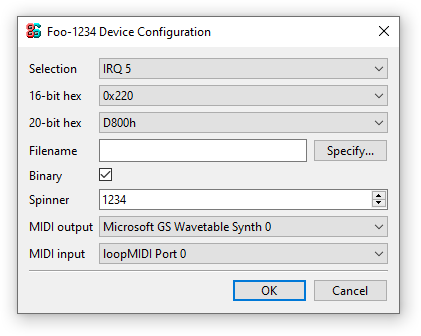
All option types currently configurable through the user interface.
These options are stored in the emulated machine’s configuration file, in a section identified by the device’s name, optionally followed by the device’s instance number (preceded by #) if it’s different from the default 0:
[Foo-1234 #1]
selection = 0
hex16 = 0220
hex20 = D8000
string = Default
fname = D:/VMs/86Box/86Box.exe
binary = 1
spinner = 1234
mac = 00:00:00
midi_out = 0
midi_in = 0
Configuration options can be specified in the config member of device_t, as a pointer to a const array of device_config_t objects terminated by an object of type CONFIG_END.
Code example: device configuration options
#include <86box/device.h>

static const device_config_t foo_config[] = {
    { "selection", "Selection",   CONFIG_SELECTION, "", 5,       "", { 0 },
        {
            { "IRQ 5", 5 },
            { "IRQ 7", 7 },
            { ""         }
        }
    },
    { "hex16",     "16-bit hex",  CONFIG_HEX16,     "", 0x220,   "", { 0 },
        {
            { "0x220", 0x220 },
            { "0x330", 0x330 },
            { ""             }
        }
    },
    { "hex20",     "20-bit hex",  CONFIG_HEX20,     "", 0xd8000, "", { 0 },
        {
            /* While the memory *segment* is displayed to the user, we store the
               *linear* (segment << 4) base address in the configuration file. */
            { "D800h", 0xd8000 },
            { "DC00h", 0xdc000 },
            { ""               }
        }
    },
    { "string",    "String",      CONFIG_STRING,    "Default" },
    { "fname",     "Filename",    CONFIG_FNAME,     "", 0, "File type (*.foo)|*.foo|Another file type (*.bar)|*.bar" },
    { "binary",    "Binary",      CONFIG_BINARY,    "", 1 /* checked by default */ },
    { "int",       "Integer",     CONFIG_INT,       "", 1234 },
    { "spinner",   "Spinner",     CONFIG_SPINNER,   "", 1234, "", { 1204, 1294, 10 } },
    { "mac",       "MAC address", CONFIG_MAC,       "", 0 },
    { "midi_out",  "MIDI output", CONFIG_MIDI_OUT,  "", 0 },
    { "midi_in",   "MIDI input",  CONFIG_MIDI_IN,   "", 0 },
    { "",          "",            CONFIG_END }
};

const device_t foo_device = {
    /* ... */
    .config = foo_config
};
Member |
Description |
|---|---|
|
Internal name for this option, used to identify it in the emulated machine’s configuration file. |
|
Description for this option, displayed in the user interface. |
|
One of the following option types:
|
|
Default string value for a |
|
Default integer value for a |
|
File type filter for a
|
|
Members:
|
|
Array of Members:
|
Configured option values can be read from within the device’s init callback with the device_get_config_* functions. These functions automatically operate in the context of the device currently being initialized.
Note
device_get_config_* functions should never be called outside of a device’s init callback. You are responsible for reading the options’ configured values in the init callback and storing them in the device’s state structure if necessary.
Parameter |
Description |
|---|---|
|
The option’s |
Return value |
The option’s configured string value, or its |
Parameter |
Description |
|---|---|
|
The option’s
|
Return value |
The option’s configured integer value ( |
Parameter |
Description |
|---|---|
|
The option’s
|
|
The default value to return if no configured value is present. |
Return value |
The option’s configured integer value ( |